Spring MVC Project 수동 생성
스프링에서 MVC Project Template는 미리 구성된 프로젝트 구조와 설정을 기본으로 제공하여 개발을 용이하게 해준다.
기본 프로젝트 '구조'와 Spring MVC Project에 사용되는 필수요소 '라이브러리 의존성', 'web.xml', 'Spring 설정파일' 등으로 구성되어 있다.
전자정부프레임워크에서 'Spring MVC Project' Template을 수동으로 생성해보겠다.
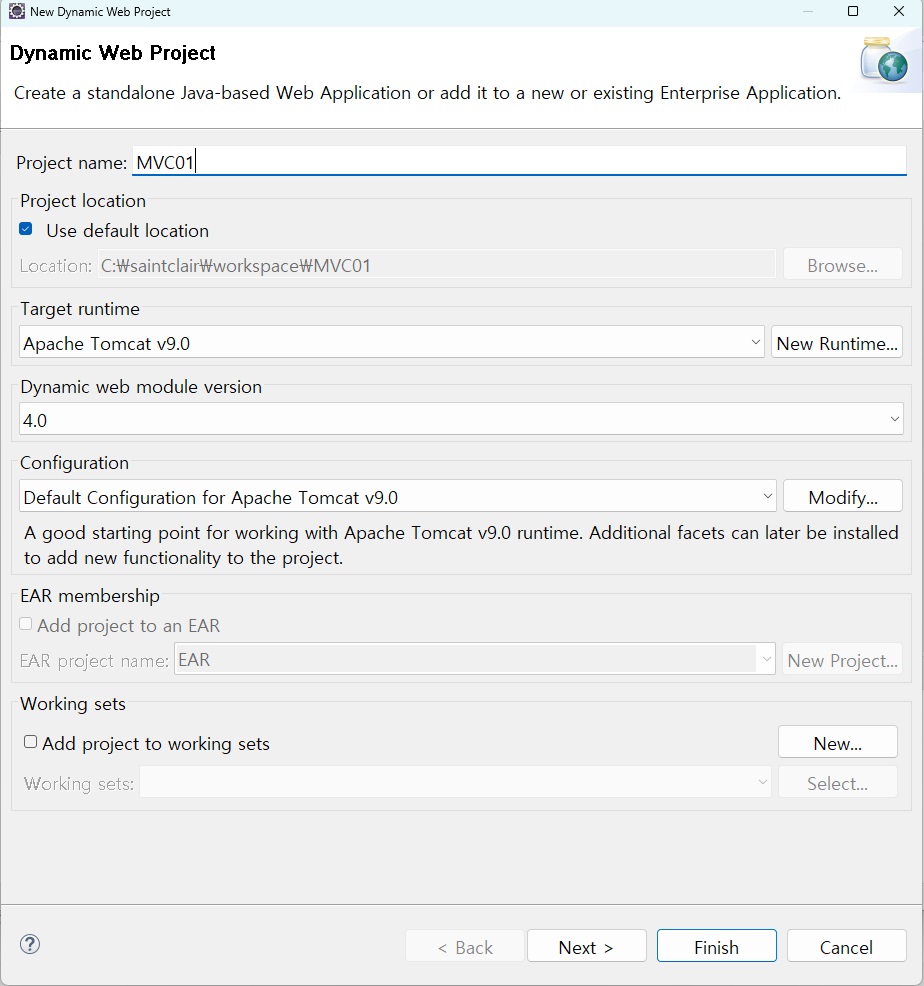
1. Dynamic Web Project 생성
> New > Dynamic Web Project
나는 초기설정을 해둬서 Target runtime란에 이미 톰캣으로 설정되어 있다.
다르게 설정되어 있다면 초기설정 필요
2. Maven 프로젝트로 변경 및 스프링 프레임워크 의존성 추가
프로젝트 우클릭 > Configure > Convert to Maven Project > finish
Maven은 프로젝트의 전체적인 사이클 및 라이브러리를 관리하는 도구이다. 필요한 라이브러리를 pom.xml 파일을 통해 지정하거나 자동으로 다운로드 할 수 있다.
*협업 과정에서 'pom.xml' 파일이 공유되기 때문에 팀원들이 동일한 개발 환경(라이브러리)에서 작업이 가능하다.
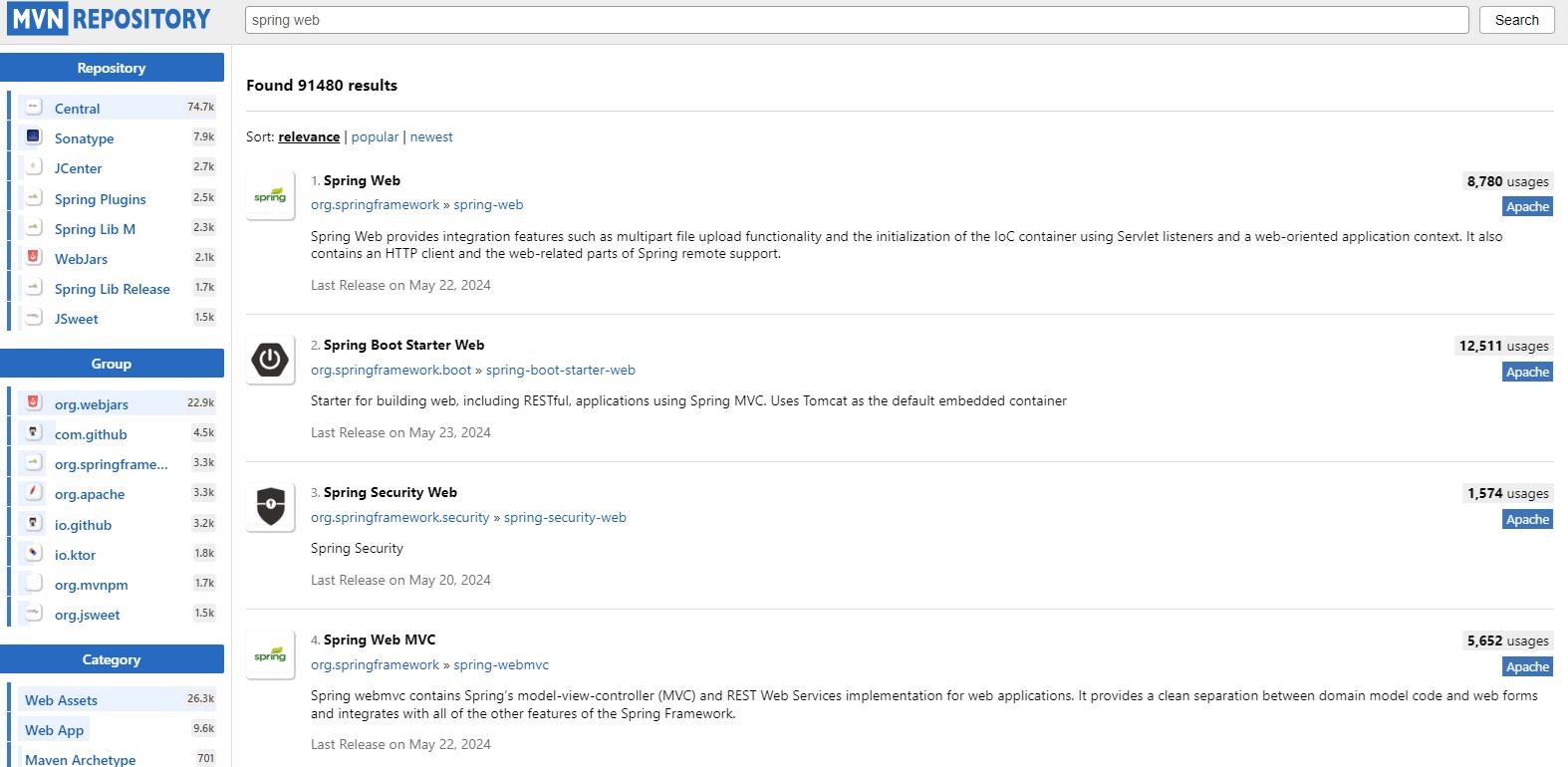
위 사이트에서 spring web을 검색 후
Spring Web과 Spring Web MVC를 클릭해 복사해서 pom.xml 파일에 붙여넣으면 된다.
(나는 탬플릿 생성시 기본 pom.xml 파일을 참고하여 입력했다.)
플러그인 부분은 이미 설정된 maven이 있어서 제외하고 아래 코드를 추가입력함.
	<properties>
		<java-version>11</java-version>
		<org.springframework-version>5.2.5.RELEASE</org.springframework-version>
		<org.aspectj-version>1.6.10</org.aspectj-version>
		<org.slf4j-version>1.6.6</org.slf4j-version>
	</properties>
	<dependencies>
		<!-- Spring -->
		<dependency>
			<groupId>org.springframework</groupId>
			<artifactId>spring-context</artifactId>
			<version>${org.springframework-version}</version>
			<exclusions>
				<!-- Exclude Commons Logging in favor of SLF4j -->
				<exclusion>
					<groupId>commons-logging</groupId>
					<artifactId>commons-logging</artifactId>
				</exclusion>
			</exclusions>
		</dependency>
		<dependency>
			<groupId>org.springframework</groupId>
			<artifactId>spring-webmvc</artifactId>
			<version>${org.springframework-version}</version>
		</dependency>

		<!-- AspectJ -->
		<dependency>
			<groupId>org.aspectj</groupId>
			<artifactId>aspectjrt</artifactId>
			<version>${org.aspectj-version}</version>
		</dependency>

		<!-- Logging -->
		<dependency>
			<groupId>org.slf4j</groupId>
			<artifactId>slf4j-api</artifactId>
			<version>${org.slf4j-version}</version>
		</dependency>
		<dependency>
			<groupId>org.slf4j</groupId>
			<artifactId>jcl-over-slf4j</artifactId>
			<version>${org.slf4j-version}</version>
			<scope>runtime</scope>
		</dependency>
		<dependency>
			<groupId>org.slf4j</groupId>
			<artifactId>slf4j-log4j12</artifactId>
			<version>${org.slf4j-version}</version>
			<scope>runtime</scope>
		</dependency>
		<dependency>
			<groupId>log4j</groupId>
			<artifactId>log4j</artifactId>
			<version>1.2.15</version>
			<exclusions>
				<exclusion>
					<groupId>javax.mail</groupId>
					<artifactId>mail</artifactId>
				</exclusion>
				<exclusion>
					<groupId>javax.jms</groupId>
					<artifactId>jms</artifactId>
				</exclusion>
				<exclusion>
					<groupId>com.sun.jdmk</groupId>
					<artifactId>jmxtools</artifactId>
				</exclusion>
				<exclusion>
					<groupId>com.sun.jmx</groupId>
					<artifactId>jmxri</artifactId>
				</exclusion>
			</exclusions>
			<scope>runtime</scope>
		</dependency>

		<!-- @Inject -->
		<dependency>
			<groupId>javax.inject</groupId>
			<artifactId>javax.inject</artifactId>
			<version>1</version>
		</dependency>

		<!-- Servlet -->
		<dependency>
			<groupId>javax.servlet</groupId>
			<artifactId>servlet-api</artifactId>
			<version>2.5</version>
			<scope>provided</scope>
		</dependency>
		<dependency>
			<groupId>javax.servlet.jsp</groupId>
			<artifactId>jsp-api</artifactId>
			<version>2.1</version>
			<scope>provided</scope>
		</dependency>
		<dependency>
			<groupId>javax.servlet</groupId>
			<artifactId>jstl</artifactId>
			<version>1.2</version>
		</dependency>

		<!-- Test -->
		<dependency>
			<groupId>junit</groupId>
			<artifactId>junit</artifactId>
			<version>4.7</version>
			<scope>test</scope>
		</dependency>
	</dependencies>
* 직접 다운받아 복사해올 때 참고

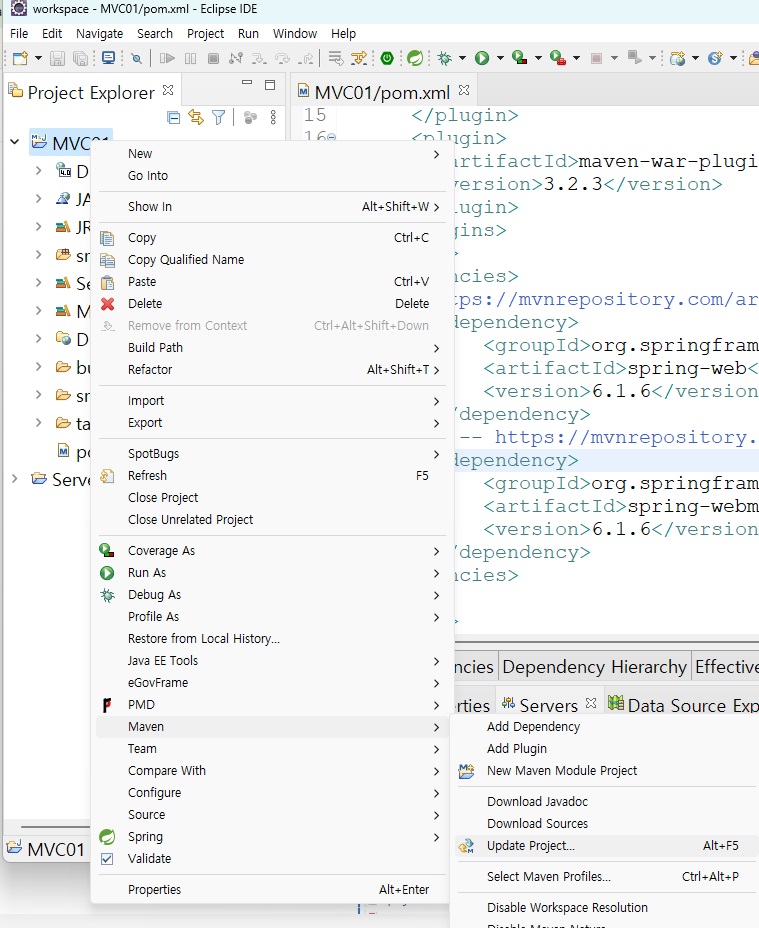
*저장 후 좌측 Maven Dependencies를 확인하면 추가한 라이브러리들을 확인할 수 있다.
이 후 Maven Update를 실행한다.
3. xml 파일 생성
Spring Project에서 xml 파일은 애플리케이션 컨텍스트를 설정하거나 웹 애플리케이션 구성을 지정하는데 사용된다.
*web.xml - 웹 서버에서 사용할 기본 설정을 입력하는 파일
1) web.xml 파일 생성
'/src/main/webapp/WEB-INF/' 경로에
"web.xml" 파일을 생성한다.
web.xml 파일은 root-context.xml, servlet-context.xml 파일을 참조한다.
프로젝트 우클릭 > Java EE Tools > Generate Deployment Descriptor Stub
*파일 생성시 에러가 난다면 아래 코드처럼 java > Java로 변경
<?xml version="1.0" encoding="UTF-8"?>
<web-app version="2.5" xmlns="http://java.sun.com/xml/ns/javaee"
	xmlns:xsi="http://www.w3.org/2001/XMLSchema-instance"
	xsi:schemaLocation="http://Java.sun.com/xml/ns/javaee https://java.sun.com/xml/ns/javaee/web-app_2_5.xsd">

	<!-- The definition of the Root Spring Container shared by all Servlets and Filters -->
	<context-param>
		<param-name>contextConfigLocation</param-name>
		<param-value>/WEB-INF/spring/root-context.xml</param-value>
	</context-param>

	<!-- Creates the Spring Container shared by all Servlets and Filters -->
	<listener>
		<listener-class>org.springframework.web.context.ContextLoaderListener</listener-class>
	</listener>

	<!-- Processes application requests -->
	<servlet>
		<servlet-name>appServlet</servlet-name>
		<servlet-class>org.springframework.web.servlet.DispatcherServlet</servlet-class>
		<init-param>
			<param-name>contextConfigLocation</param-name>
			<param-value>/WEB-INF/spring/appServlet/servlet-context.xml</param-value>
		</init-param>
		<load-on-startup>1</load-on-startup>
	</servlet>

	<servlet-mapping>
		<servlet-name>appServlet</servlet-name>
		<url-pattern>/</url-pattern>
	</servlet-mapping>

	<filter>
		<filter-name>encodingFilter</filter-name>
		<filter-class>org.springframework.web.filter.CharacterEncodingFilter</filter-class>
		<init-param>
			<param-name>encoding</param-name>
			<param-value>UTF-8</param-value>
		</init-param>
		<init-param>
			<param-name>forceEncoding</param-name>
			<param-value>true</param-value>
		</init-param>
	</filter>
	<filter-mapping>
		<filter-name>encodingFilter</filter-name>
		<url-pattern>/*</url-pattern>
	</filter-mapping>

</web-app>
2) root-context.xml 파일 생성
/src/main/webapp/WEB-INF/spring/' 경로에 'root-context.xml' 파일 생성
본 파일이 위치할 폴더 우클릭 > New > Other > xml 검색 후 파일 생성
<?xml version="1.0" encoding="UTF-8"?>
<beans xmlns="http://www.springframework.org/schema/beans"
	xmlns:xsi="http://www.w3.org/2001/XMLSchema-instance"
	xmlns:tx="http://www.springframework.org/schema/tx"
	xmlns:mybatis-spring="http://mybatis.org/schema/mybatis-spring"
	xsi:schemaLocation="http://mybatis.org/schema/mybatis-spring http://mybatis.org/schema/mybatis-spring-1.2.xsd
	http://www.springframework.org/schema/beans https://www.springframework.org/schema/beans/spring-beans.xsd
	http://www.springframework.org/schema/tx http://www.springframework.org/schema/tx/spring-tx-3.0.xsd">

	<!-- Root Context: defines shared resources visible to all other web components -->

</beans>
3) servlet-context.xml 파일 생성
/src/main/webapp/WEB-INF/spring/appServlet/ 경로에 'servlet-context.xml' 파일 생성
<?xml version="1.0" encoding="UTF-8"?>
<beans:beans xmlns="http://www.springframework.org/schema/mvc"
	xmlns:xsi="http://www.w3.org/2001/XMLSchema-instance"
	xmlns:tx="http://www.springframework.org/schema/tx"
	xmlns:beans="http://www.springframework.org/schema/beans"
	xmlns:context="http://www.springframework.org/schema/context"
	xsi:schemaLocation="http://www.springframework.org/schema/mvc https://www.springframework.org/schema/mvc/spring-mvc.xsd
		http://www.springframework.org/schema/beans https://www.springframework.org/schema/beans/spring-beans.xsd
		http://www.springframework.org/schema/context https://www.springframework.org/schema/context/spring-context.xsd
		http://www.springframework.org/schema/tx http://www.springframework.org/schema/tx/spring-tx-3.0.xsd">

	<!-- DispatcherServlet Context: defines this servlet's request-processing infrastructure -->

	<!-- Enables the Spring MVC @Controller programming model -->
	<annotation-driven />

	<!-- Handles HTTP GET requests for /resources/** by efficiently serving up static resources in the ${webappRoot}/resources directory -->
	<resources mapping="/resources/**" location="/resources/" />

	<!-- Resolves views selected for rendering by @Controllers to .jsp resources in the /WEB-INF/views directory -->
	<beans:bean class="org.springframework.web.servlet.view.InternalResourceViewResolver">
		<beans:property name="prefix" value="/WEB-INF/views/" />
		<beans:property name="suffix" value=".jsp" />
	</beans:bean>

</beans:beans>
참고 페이지
https://wildeveloperetrain.tistory.com/m/347
'Backend > Spring' 카테고리의 다른 글
| [Spring Project] button 간격 조절 (0) | 2024.05.31 |
|---|---|
| [Spring] BootStrap 오픈소스 다운 받아 적용하기 (0) | 2024.05.31 |
| 게시판 CRUD 진행 중 javax.annotation.resource를 import하지 못해서 발생하는 에러 (0) | 2024.01.04 |
| Java VM Arguments 설정? (0) | 2024.01.04 |
| [Spring] component-scan (0) | 2023.06.04 |